 Drawing, pixel art & animation
Flipline
A few drawings. A little life. Make a flipbook in your browser.
Flipline is a free drawing, pixel-art and animation studio that runs on your device. Sketch poses across layers, compare onion skins and play drawings with adjustable holds. Pixel Studio adds indexed sprite drawing, palettes and live loops; Retro Lab converts photos with color development, dithering and shared batch recipes. Transform marks, let Flipline draw the inbetweens between two key poses, export compact GIFs, videos, PNG sequences, sprite atlases or storyboards, and keep editable project files for your next idea.
Screenshots
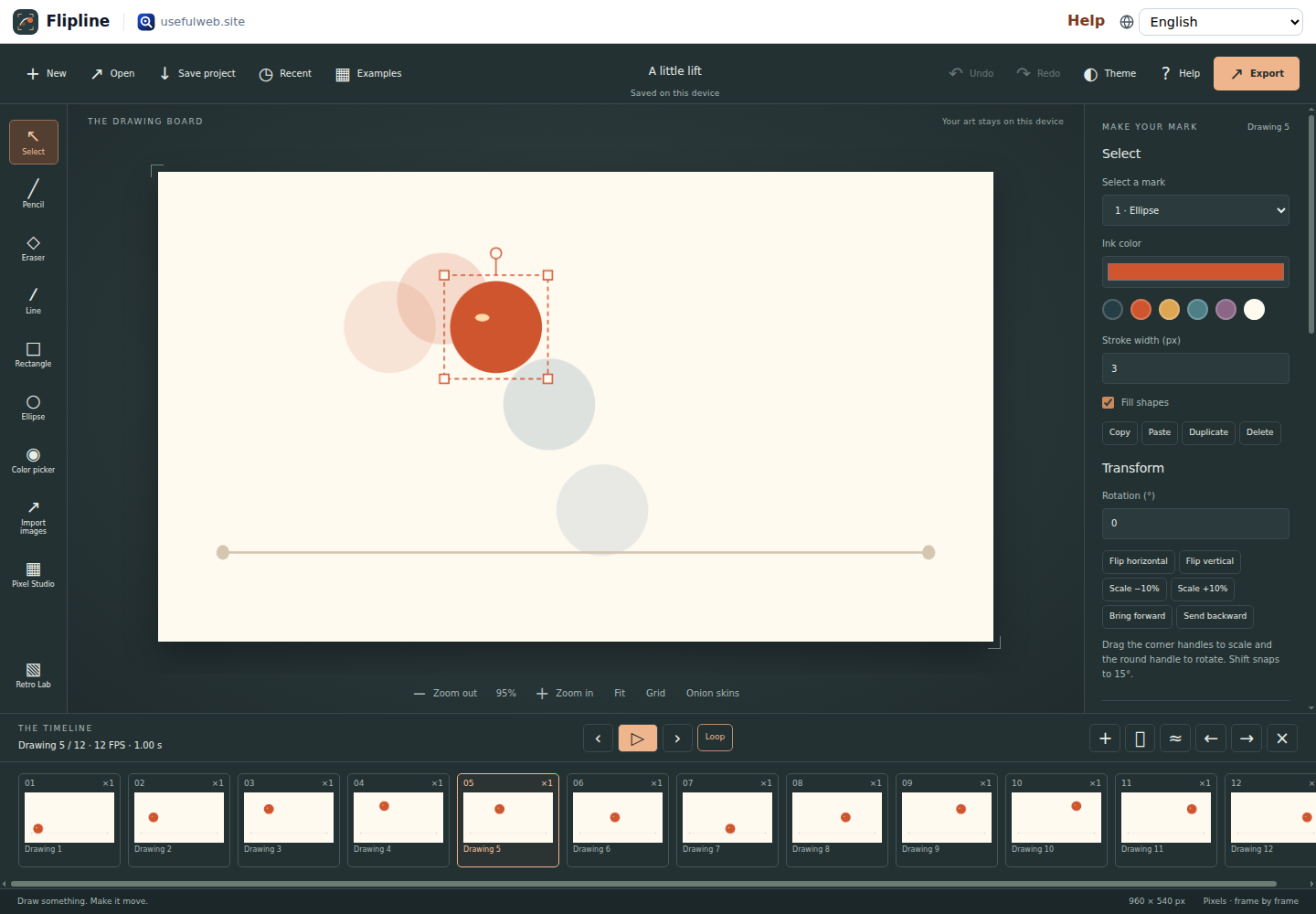
- A quiet drawing board, handles for every mark, a little movement
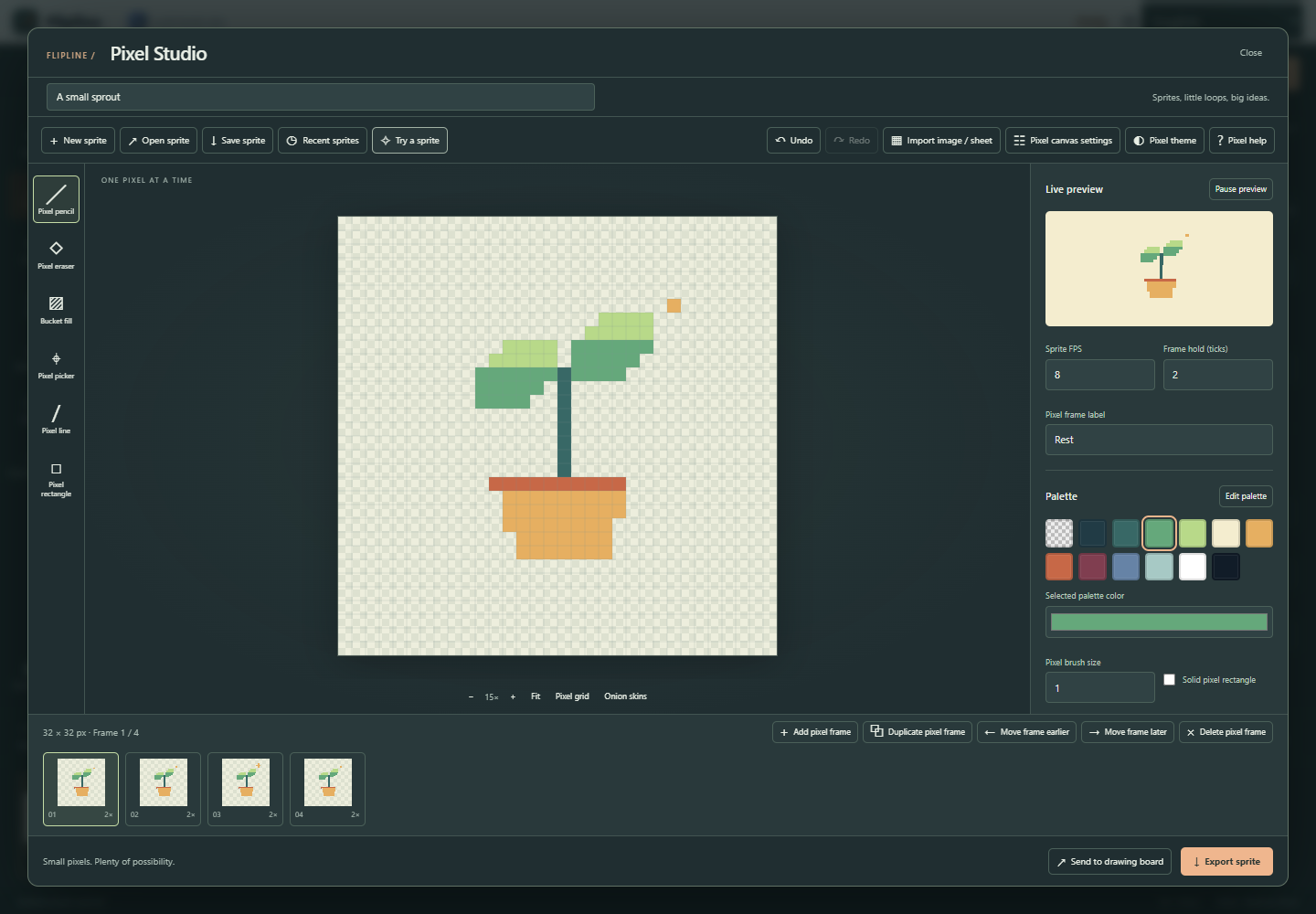 A pixel canvas, an editable palette and a little loop while you draw
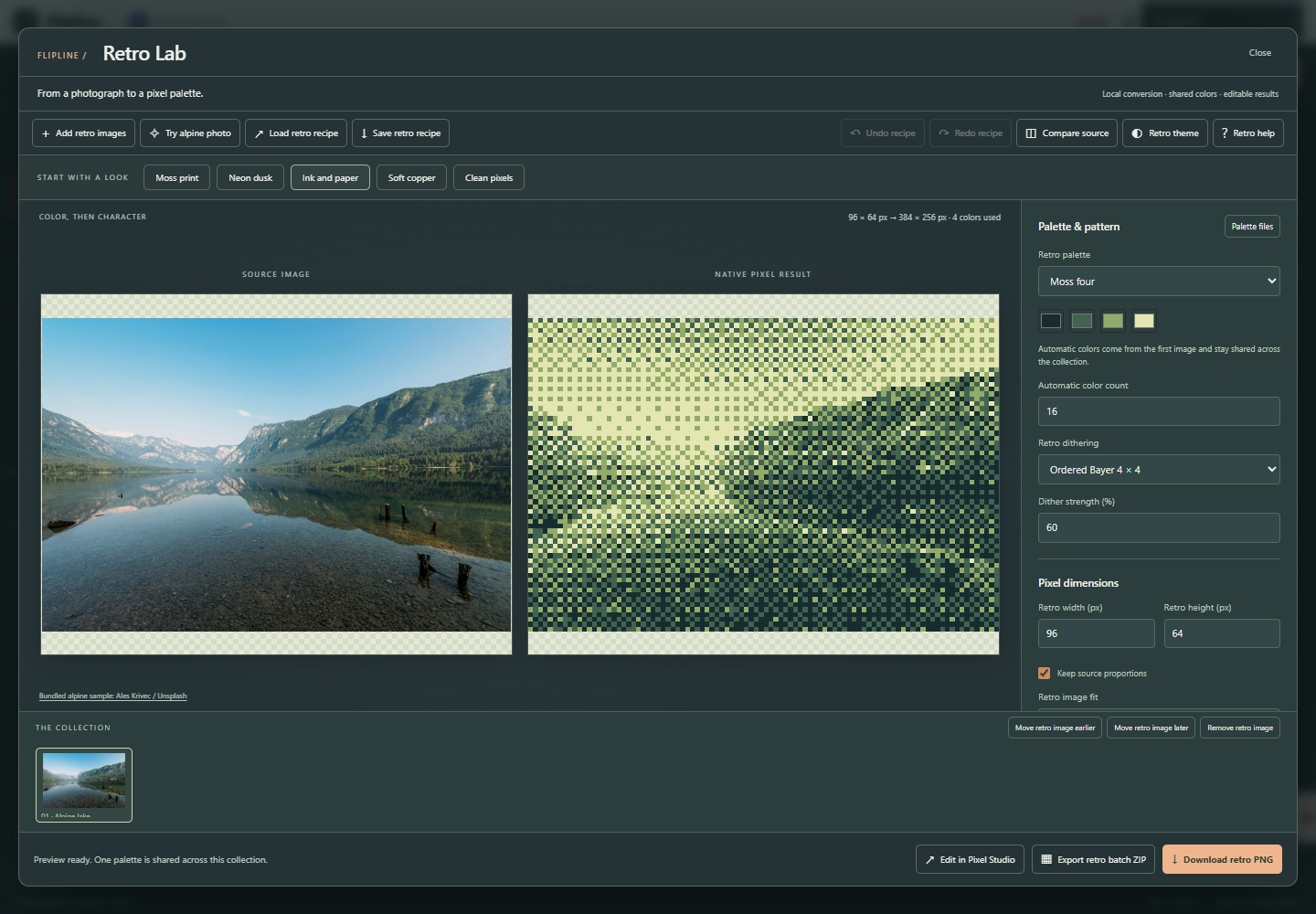 A photograph becomes an editable pixel asset with a shared palette and recipe
Features
Start with a mark
Draw with a pencil or eraser, add lines, rectangles and ellipses, and choose ink, stroke width and shape fill.
A timeline you can feel
Add blank drawings, duplicate poses, reorder them and hold each drawing for 1–10 timeline ticks.
See the pose before
Up to three previous and next drawings appear as red and blue onion skins with adjustable opacity. Ping-pong playback checks loops that swing back.
Give your scene layers
Up to four layers keep the stage and action separate. Rename, reorder, hide, lock and change opacity.
Adjust every mark
Select a stroke, shape or image to move, scale, rotate, flip or restack it with handles or exact controls. Copy, paste, duplicate, delete and nudge with the keyboard.
Inbetweens on request
Duplicate a key pose, change it, then insert 1–8 inbetweens with even or eased spacing. Paired marks interpolate position, shape, rotation, color and width.
Find the right rhythm
Play at 1–30 FPS, loop a motion study or inspect drawings one at a time. Timing uses drawing holds.
Bring a sequence
Import PNG, JPEG or WebP images as new drawings. Move and scale them with the canvas in an editable project.
Let it move elsewhere
Export compact GIFs with an adaptive palette and transparency, WebM videos, PNG sequences with timing JSON, sprite sheets with atlas coordinates or a printable storyboard.
Keep the editable idea
Local browser autosave, eight recent projects, .flipline.json downloads and Save to Drive for signed-in visitors preserve drawings and settings.
Small pixels, big ideas
Pixel Studio draws crisp pencils, lines, rectangles and bucket fills on an indexed canvas with up to 32 colors. Remap palettes, mirror the brush, flip, shift or rotate pixels without smoothing.
A loop while you draw
Live sprite preview plays while you edit. Duplicate frames, set holds and layers, import uniform sprite sheets and export exact palette GIFs.
Keep the pixel original
Pixel sprites have their own browser autosave, recent projects, undo and editable .flipline-pixels.json files. PNG and sprite atlases retain transparency.
Give images another era
Retro Lab combines authored palettes, RGB adjustments, gamma and saturation with ordered or error-diffusion dithering. Compare the source with the exact pixel result.
A collection, one color language
Apply a shared palette and recipe to eight images. Export PNGs and editable pixel projects together; import and export HEX, GPL and JASC-PAL palettes.
Useful beyond the studio
Exposure sheets, sprite layout planning and editable motion study generation are available through HTML, API and MCP.
Templates
Start from a ready-made project and change it to fit.
A little lift
A bouncing ball study with twelve editable drawings.
Around we go
A looping orbit to explore spacing and onion skins.
One small wave
Seven dots make a traveling wave.
Slow in, slow out
See how spacing changes the feel of motion.
A small pixel sprout
Open Pixel Studio with an editable sprout, a palette and a four-frame loop.
An alpine moss print
Open Retro Lab with a four-color palette, ordered dithering and a landscape conversion recipe.
For AI agents
Flipline runs on a deterministic engine. The same functions are available as tools with a JSON API and MCP, so scripts and AI agents get exactly the results the app shows.
- Animation Exposure Sheet – Turn drawing holds into a precise animation timing sheet.
Tool page ·POST https://flipline.usefulweb.site/api/v1/tools/flipline-exposure-sheet/calculate· MCPflipline_exposure_sheet - Sprite Sheet Layout Planner – Plan an animation atlas with exact frame rectangles and padding.
Tool page ·POST https://flipline.usefulweb.site/api/v1/tools/flipline-sprite-sheet/calculate· MCPflipline_sprite_sheet - Animation Motion Study Generator – Generate an editable flipbook to compare animation easing curves.
Tool page ·POST https://flipline.usefulweb.site/api/v1/tools/flipline-motion-study/calculate· MCPflipline_motion_study - Pixel Art Image Converter – Convert images into pixel art with palettes, dithering and retro effects.
Tool page ·POST https://flipline.usefulweb.site/api/v1/tools/flipline-pixel-quantizer/calculate· MCPflipline_pixel_quantizer - Pixel Grid Transform – Flip, rotate or shift an indexed pixel sprite without blur.
Tool page ·POST https://flipline.usefulweb.site/api/v1/tools/flipline-pixel-transform/calculate· MCPflipline_pixel_transform - Pixel Palette Format Converter – Convert HEX, GIMP GPL and JASC-PAL palettes without changing color order.
Tool page ·POST https://flipline.usefulweb.site/api/v1/tools/flipline-palette-converter/calculate· MCPflipline_palette_converter - Retro Pixel Art Batch Processor – Apply one retro palette and effect recipe to a ZIP of images.
Tool page ·POST https://flipline.usefulweb.site/api/v1/tools/flipline-retro-batch/calculate· MCPflipline_retro_batch
- MCP endpoint (Streamable HTTP):
https://flipline.usefulweb.site/mcp - Project file format (JSON Schema): https://flipline.usefulweb.site/project.schema.json
- OpenAPI description: /openapi.json · llms.txt · API & MCP
Build a project through the API, then open it in the app with a link to https://flipline.usefulweb.site/app#project=<base64url JSON>.
Import & export
Import
- Flipline project (.flipline.json)
- PNG
- JPEG
- WebP
- Uniform PNG/JPEG/WebP sprite sheets
- Pixel sprite (.flipline-pixels.json)
- Retro recipe (.flipline-retro.json)
- HEX, GIMP GPL or JASC-PAL text palette
Export
- Retro recipe (.flipline-retro.json)
- HEX, GPL and JASC-PAL palettes
- Retro PNG and editable asset batch ZIP
- Pixel sprite (.flipline-pixels.json)
- Flipline project (.flipline.json)
- Animated GIF (adaptive palette, optional transparency)
- Video (WebM, or MP4 where supported)
- PNG sequence + timing JSON (ZIP)
- Sprite sheet + atlas JSON (ZIP)
- Current drawing PNG
- SVG with embedded PNG
- Print / PDF via browser
- Storyboard print / PDF
Keyboard shortcuts
| Keys | Action |
|---|---|
| B / E / V | Pencil / Eraser / Select |
| L / R / O / I | Line / Rectangle / Ellipse / Color picker |
| N / Shift + N | Add blank / duplicate drawing |
| T | Insert inbetweens |
| , / . | Previous / next drawing |
| Shift + drag | 45° lines, squares, 15° rotation steps |
| + / − / Ctrl + wheel | Zoom |
| K | Onion skins |
| Space | Play / pause |
| Ctrl + S | Save editable project |
| Ctrl + O | Open editable project |
| Ctrl + Z / Ctrl + Shift + Z | Undo / redo |
| Ctrl + C / Ctrl + X / Ctrl + V / Ctrl + D | Copy / cut / paste / duplicate selected mark |
| Delete | Delete selected mark |
| Arrow keys | Nudge selected mark or switch drawing |
| F / G / ? | Fit / Grid / Help |
Frequently asked questions
What does a retro recipe keep?
Retro Lab recipes save conversion settings and a resolved palette, without source images. Reimport photos after reopening. Settings autosave locally; batch ZIPs include PNGs, editable pixel projects, the shared recipe and a manifest. Use /static/apps/flipline/retro.schema.json for the format.
Which palette and dithering formats are supported?
Retro Lab uses up to 32 RGB colors, authored presets or imported HEX, GIMP GPL and JASC-PAL text palettes. Choose nearest matching, ordered Bayer 4 × 4 or serpentine Floyd–Steinberg with adjustable strength. Source alpha below the threshold becomes transparent; PNG scaling repeats pixels exactly.
How does Pixel Studio fit with the drawing board?
Pixel Studio is an independent pixel-art workflow inspired by Piskel. It keeps indexed pixels, layers, palettes and animation holds in .flipline-pixels.json files; /static/apps/flipline/pixels.schema.json documents the format. Open from the rail or the main Open button, or send rendered frames to the drawing board. It does not open .piskel files.
Does pixel GIF export preserve my colors?
Pixel Studio uses the project palette and transparent index zero. Fully opaque palette pixels keep their exact RGB values. Layer-opacity blends map back to the nearest palette color; alpha below 128 becomes transparent. PNG keeps full alpha. The drawing board GIF exporter instead builds an adaptive palette of up to 256 colors from your drawings; drawings with few colors keep them exactly.
Do my drawings leave this device?
The workspace processes drawings and exports locally. Editable projects autosave in this browser, and you can download a file backup. Pixel Studio also runs locally. The separate Pixel Art Image Converter and Retro Pixel Art Batch Processor upload source files to the server. Palette, planning and grid tools use text or numeric inputs.
Is this Pencil2D in a browser?
Flipline is an independent app inspired by the frame-by-frame drawing, timeline and onion skin workflow. It does not reuse Pencil2D branding or code and cannot open Pencil2D PCL/PCLX projects.
What is a drawing hold?
A hold of 2 lasts two timeline ticks. At 12 FPS it lasts one sixth of a second. GIF durations round to 10 ms units; the exposure sheet reports both ideal and GIF timing.
Can I save to Google Drive?
Signed-in visitors who connected Google Drive get Save to Drive, Open from Drive and optional auto-save in the workspace top bar. Flipline stores the editable drawing-board project as JSON in your Drive; Pixel Studio sprites and Retro Lab recipes are saved as files from their own windows.
Which exports preserve transparency?
Enable Transparent background in Canvas settings. PNG sequences, sprite sheets and PNG exports keep full alpha; GIFs keep binary transparency (alpha below 50% becomes transparent). Videos always use the paper color. SVG export embeds the rendered PNG.
How do automatic inbetweens work?
Insert inbetweens adds 1–8 drawings after the current one. Marks are paired with the next drawing by ID (Duplicate drawing keeps IDs), then by order among marks of the same kind. Points, rotation, color and stroke width are interpolated with even or eased spacing; strokes are resampled along their length. Unpaired marks are copied from the earlier drawing. It does not understand artwork, so complex shape changes still need hand drawing.
How is the video export made?
Flipline renders each drawing and records them in real time with the browser MediaRecorder, as WebM (or MP4 where WebM is unavailable). Exports are limited to 60 seconds and 1600 px per side; keep the tab visible while recording. There is no audio track.
Can an agent create an editable project?
Yes. The motion study generator returns a Flipline project, and /project.schema.json documents the file format. Open it from a file or a #project= base64url JSON fragment.
Limitations
What Flipline does not do (yet):
- Retro Lab: eight images, 4 MB and 2 MP per image, 8 MP decoded in total, 128 native pixels per side and 1–8 integer PNG scaling. Recipes contain settings only.
- Retro conversion uses binary alpha, nearest RGB palette matching and manual controls. No video conversion, AI stylization, binary palette formats or PixaTool preset import.
- Pixel Studio: 1–128 pixels per side, 24 frames, four layers, 32 palette colors and 524288 stored cel pixels. PNG/JPEG/WebP imports are limited to 4 MB and 2 MP; editable pixel files to 4 MB. Pixel Studio edits indexed pixels; Retro Lab adds dithering before import.
- Pixel GIFs use binary transparency and at most 12 million total frame pixels. No animated GIF import, .piskel import, arbitrary selections or tile-map editing.
- Up to 24 drawings, four layers, 2 MP per canvas and 1600 px per side. Holds are 1–10 ticks at 1–30 FPS.
- Project limits: 50000 points, 2000 marks and approximately 6 MB of embedded image data. Imports are limited to 16 MB project files or 3 MB per image.
- Drawing board GIFs use one adaptive palette of up to 256 colors without dithering, binary transparency, at most 24 million total frame pixels and 10 ms timing units. Video export records in real time (up to 60 seconds, no audio) and depends on browser MediaRecorder support.
- No audio timeline, camera animation, pressure-sensitive brushes or multi-mark selection. Inbetweens interpolate paired marks only; they do not redraw changing shapes.
- Scaling is uniform around the mark center and keeps stroke width; there is no skew or per-point editing. Selection uses the mark bounds. Canvas resizing scales all normalized drawing positions.
- Browser storage can be cleared or evicted. Download an editable project as a durable backup.
Tutorials
Learn Flipline step by step.
- Your first little animationDraw a pose, duplicate it and bring it to life.Beginner 5 min
- Layers, image sequences and useful exportsOrganize drawings and export animation files for the web or a game.Intermediate 6 min
- Make a pixel sprite and a little loopDraw crisp pixels, work with a palette, import sprite sheets and export a transparent animation.Beginner 7 min
- Turn a photo into a retro pixel imageMake a limited-color image, compare dithering styles and keep a consistent palette across a batch.Beginner 7 min
- Transform marks and let Flipline draw the inbetweensScale, rotate, flip and reorder marks, then fill the gaps between two key poses automatically.Intermediate 6 min
Ready to try it?
Other premium apps
-

Kerfwise
Cabinet & furniture CAD
Design cabinets and furniture, get cut lists, optimised sheet layouts, costs and drawings.
-

Kinetica
Robot motion studio
Simulate robot arms in your browser: kinematics, trajectories, collisions, program export.
-

Threadsmith
Embroidery digitizing studio
Draw or import artwork, turn it into stitches, export DST, PES, JEF or EXP files.
-

Ohmforge
Virtual electronics workbench
Draw a circuit, switch it on, and measure it with real-feeling bench instruments.
-

Twinworks
Factory digital twin & production simulation
Model a production line, simulate it and find the bottleneck — free, in your browser.
-

Lumina
Photo editor & image toolkit
Bring out what you saw. A free photo studio, right in your browser.